Website pop-ups are one of the most effective tools for increasing conversions, capturing leads, and promoting offers. However, traditional pop-ups can sometimes interrupt the browsing experience if they appear at the wrong time. Modern marketers now prefer smarter solutions that keep promotions visible without annoying visitors. This is where Teasers come in.
With Claspo, teasers are small mini-widgets that remain visible on the screen and allow visitors to open a pop-up whenever they are ready. Instead of forcing users to interact with a large pop-up immediately, teasers gently remind them about your offer. This approach improves user experience while still helping businesses increase conversions and engagement.
Ready to turn more visitors into leads and customers? Join now and start using Claspo today to create powerful pop-ups and teaser widgets without any coding. In just a few minutes, you can design high-converting campaigns that keep your offers visible and help grow your business faster.
Master pop-up teaser creation in Claspo and increase user engagement. Follow our 2026 guide for smart, non-intrusive website marketing.
What Are Pop-Up Teasers?
A teaser is a small clickable tab or widget that sits on the edge of a webpage and promotes an offer without interrupting the user’s browsing. When a visitor clicks the teaser, the related pop-up opens instantly.
Instead of displaying a large promotional window immediately, teasers act as a subtle reminder. Visitors can explore your website freely while still seeing your promotion. If they become interested, they can simply click the teaser to open the offer.
Teasers are especially useful because they remain visible even if the visitor closes the pop-up. This ensures your promotion does not disappear completely and users can return to it whenever they want.
If you want to capture visitors before they leave your website, exit-intent pop-ups can be extremely effective. They appear when a user is about to close the page and encourage them to take action, such as claiming a discount or subscribing to your newsletter. To learn how to set this up step-by-step, check out our detailed guide on Create an Exit Intent Popup in Shopify with Claspo, where we explain how to recover abandoning visitors and boost conversions using smart pop-up triggers.
Why Teasers Are Important for Website Conversions
Want an easier way to capture emails and promote your offers? Sign up now for Claspo and start building smart pop-ups and teasers that improve engagement and conversions. The simple drag-and-drop editor makes it easy for anyone to create professional widgets.
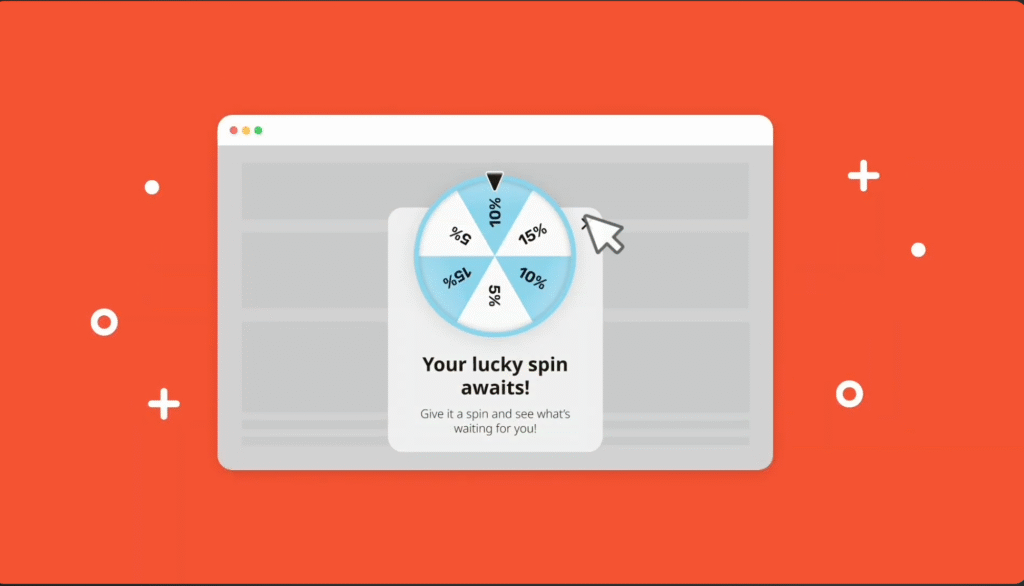
In 2026, user experience is a critical factor for website success. Visitors expect websites to be smooth, fast, and non-intrusive. Traditional pop-ups sometimes disrupt reading or browsing, which can frustrate users.
Teasers solve this problem by giving visitors control over when they want to interact with a promotion. Because they are small and placed at the edge of the screen, they attract attention without interrupting the content.
Another major advantage is visibility. Even if someone closes a pop-up, the teaser remains on the page as a reminder. This increases the chances that a visitor will return and engage with the offer later. Many marketers report that teasers improve engagement because users feel less pressure to act immediately.
For eCommerce stores, SaaS platforms, and content websites, teasers provide a balanced approach between marketing and user experience.
How to Create Pop-Up Teasers in Claspo
Creating teasers in Claspo is simple and does not require coding. The platform allows users to build widgets using an intuitive visual editor.
To begin, log in to your Claspo dashboard and go to the widget section. Here you can either select an existing pop-up widget or create a new one from scratch. Since teasers are connected to pop-ups, you will first need to have a widget that represents the main pop-up you want to promote.
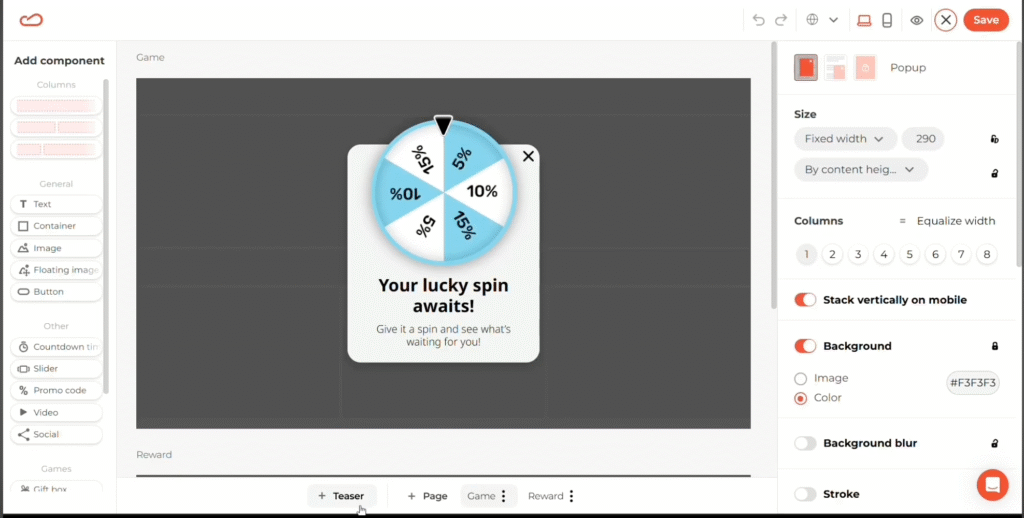
Once you open the widget editor, scroll down to the bottom of the page where the widget pages are located. In this section, you will find an option labeled “+ Teaser.” Clicking this button instantly creates a teaser connected to your pop-up.
The editor will then allow you to customize the teaser just like you would design a regular widget. The entire setup process is done through simple clicks and design options, making it easy even for beginners.
If you’re looking for a modern way to boost website conversions, get started with Claspo today. Create beautiful pop-ups, teasers, and interactive offers that attract attention without disturbing your visitors’ browsing experience.
Customizing Your Teaser Design
After creating the teaser, the next step is customizing its appearance. The flexibility offered by Claspo allows you to match the teaser perfectly with your website’s branding.
One of the first things you can adjust is the teaser’s position. Teasers can be placed on any edge of the screen, including the left side, right side, top, or bottom. The placement you choose should depend on the layout of your website and the elements already present on the page.
Orientation is another important design choice. Claspo allows both horizontal and vertical teasers. Horizontal teasers work well when placed at the top or bottom of the screen and resemble small banners. Vertical teasers, on the other hand, are usually placed on the left or right side and appear as slim clickable tabs.
In addition to placement and orientation, you can customize colors, fonts, and background styles. This allows the teaser to blend naturally with your website’s design. Businesses often use brand colors and typography to make the teaser look like a natural part of the interface rather than an advertisement.
Adjusting font size and teaser dimensions is also important. A teaser should be noticeable but not too large. The goal is to attract attention without becoming distracting.
Adding a Close Button for Better User Experience
Not every visitor wants to interact with promotional content. Some people prefer to browse a website without seeing offers or marketing messages.
To respect this preference, teasers include a close button that allows visitors to hide the teaser whenever they want. This small feature significantly improves the overall user experience because it gives visitors control over what they see on the page.
When users feel that a website respects their preferences, they are more likely to trust the brand and return in the future.
Setting Display Rules for Teasers
Teasers follow the same display rules as pop-ups in Claspo, which gives you complete control over when they appear.
You can choose to display a teaser before the pop-up appears, allowing visitors to open the promotion whenever they want. Another option is to show the teaser after the pop-up has been closed. This ensures the offer remains accessible even if a visitor initially dismisses it.
Some marketers prefer to use both options together. The teaser appears before the pop-up, and if the visitor closes the pop-up, the teaser stays visible so the offer can still be reopened later.
An important feature is that the teaser automatically hides whenever the pop-up is open. This prevents visual overlap and keeps the interface clean and distraction-free.
Publishing and Testing Your Teaser
After finishing the design and display settings, the final step is publishing your widget. Once published, the pop-up will appear according to the rules you configured, while the teaser remains visible on the page.
When visitors close the pop-up, the teaser continues to sit on the edge of the screen, ready to be opened again at any time. This persistent visibility increases the chances of conversions because users can interact with the offer whenever they feel interested.
Testing your teaser is also important. Visit your website as a normal user would and make sure the teaser appears in the correct position and functions properly.
Looking to make your website more interactive and fun for visitors? A Pick a Gift popup is a great way to engage users while offering discounts or rewards. Learn how to set it up step-by-step in our guide Create a Pick a Gift Popup With Claspo and start boosting engagement and conversions today.
Best Ways to Use Teasers for Marketing
Teasers can be used in many creative ways depending on the type of website you run.
Online stores often use teasers to promote discounts or seasonal sales. For example, a small teaser might say “Unlock 10% Off” and open a pop-up containing a coupon code.
Content websites frequently use teasers to encourage visitors to subscribe to newsletters. A teaser placed on the side of the screen can invite readers to join an email list without interrupting their reading experience.
Teasers also work well for gamified promotions such as spin-the-wheel offers, scratch cards, or reward games. These interactive experiences can significantly increase engagement because visitors are naturally curious about what they might win.
B2B companies often use teasers to promote free demos, consultations, or downloadable resources such as eBooks and guides.
Stop losing potential leads and start converting more visitors. Try Claspo today to design engaging teaser widgets and pop-ups that keep your promotions visible until visitors are ready to act.
Best Practices for Teasers in 2026
To get the best results from teasers, it is important to keep the message simple and direct. Short phrases such as “Get Your Discount,” “Unlock Offer,” or “Join Our Newsletter” work much better than long promotional text.
Another important practice is matching the teaser with your website branding. Using the same colors and fonts helps the teaser feel integrated into the design rather than looking like an external advertisement.
Testing different placements can also improve performance. Some websites perform better with teasers on the right side of the screen, while others get more clicks from bottom-positioned teasers.
Combining teasers with smart pop-up triggers such as exit intent can further improve conversion rates.
Comprehensive Growth Services for Your Business
At Axiabits, we help businesses grow smarter, faster, and more efficiently with cutting-edge digital solutions. Our goal is simple: turn your website traffic into real customers while keeping the user experience smooth and engaging.
1. Pop-Up & Teaser Solutions
Design interactive pop-ups and teasers that keep your offers visible without disturbing visitors. Perfect for lead generation, discounts, and gamified campaigns.
2. Email Marketing Automation
Reach your audience at the right time with automated campaigns, newsletters, and personalized workflows that convert.
3. Conversion Rate Optimization (CRO)
Optimize every part of your website, from pop-ups to CTAs, to increase conversions and maximize ROI.
4. Gamified Marketing Campaigns
Engage visitors with spin-the-wheel discounts, pick-a-gift promotions, and other fun interactive campaigns.
5. Full Digital Marketing Strategy
From SEO and social media to PPC and lead generation, we create end-to-end strategies tailored to your business goals.
Ready to take your website and marketing to the next level? Book Now with Axiabits and start converting visitors into loyal customers today!
Final Thoughts
Teasers are becoming one of the most effective tools for non-intrusive website marketing. They allow businesses to keep their offers visible while giving visitors the freedom to interact whenever they choose.
With the help of Claspo, creating and customizing teasers is incredibly simple. The platform provides a visual editor, flexible placement options, and powerful display rules that make it easy for anyone to implement this strategy.
By using teasers correctly, businesses can increase engagement, improve user experience, and boost conversions without overwhelming visitors.
In 2026, smart marketers understand that successful promotion is not about forcing attention but about offering value at the right moment. Teasers make this possible by keeping your message visible until visitors are ready to act.
Take your website marketing to the next level. Create your free account on Claspo today and start building high-converting pop-ups and teaser widgets that help you grow your email list, increase engagement, and drive more sales.
Disclaimer
This article features affiliate links, which indicate that if you click on any of the links and make a purchase, we may receive a small commission. There’s no additional cost to you, and it helps support our blog so we can continue delivering valuable content. We endorse only products or services we believe will benefit our audience.
Frequently Asked Questions
What are pop-up teasers in Claspo?
Pop-up teasers are small mini-widgets that stay visible on the edge of your website and allow visitors to open a pop-up whenever they want. Unlike traditional pop-ups that interrupt users, teasers provide a non-intrusive way to promote offers such as discounts, newsletter sign-ups, or lead generation forms.
How do teasers improve website conversions?
Teasers improve conversions because they keep promotional offers visible without disturbing the visitor’s browsing experience. When users see a teaser on the screen, they can open the pop-up at their preferred time, which increases engagement and reduces the chances of visitors leaving without interacting with your offer.
Can I customize teaser design in Claspo?
Yes, Claspo allows full customization of teaser design. You can change the teaser’s position, orientation (horizontal or vertical), colors, fonts, size, and background to match your website branding. This flexibility helps businesses create teasers that blend naturally with their site design.
When should a teaser appear on a website?
Teasers can appear before a pop-up, after a pop-up is closed, or both. Many marketers use teasers as a reminder for visitors who close a pop-up so they can easily reopen the offer later without needing to reload the page.
What types of offers work best with teasers?
Teasers work best with promotional campaigns such as discount offers, email subscription forms, gamified pop-ups, product announcements, and free demo bookings. Since teasers remain visible on the page, they help increase engagement with these types of offers.