If you’re looking to build a fully functional personal AI assistant that can automate tasks, manage apps, and run 24/7 — without paying for expensive SaaS tools — this guide is for you.
In this step-by-step guide, you’ll learn how to install Clawdbot (now rebranded as Moltbot) for free using the Gemini API and host it on AWS EC2. Install Moltbot (formerly Clawdbot) for free using Gemini API and AWS. Detailed setup guide covering EC2, Node.js, API keys, and messaging integrations.
By the end of this guide, you’ll have:
- A self-hosted AI assistant running 24/7
- Integrated with apps like Telegram, WhatsApp, Discord, Slack, and more
- Powered by Google’s Gemini API
- Hosted on AWS cloud for reliability
Let’s get started.
What Is Clawdbot / Moltbot?
Clawdbot (recently rebranded to Moltbot in early 2026) is an open-source AI agent that connects modern large language models (LLMs) to real-world applications.
Unlike normal chatbots, it can:
- Send emails
- Automate browser tasks
- Run scripts
- Send proactive summaries
- Control messaging platforms
- Store long-term memory
It runs on your own computer or server, giving you full data control and privacy.
Why It Stands Out
✔ Open Source & Free (MIT License)
✔ Runs locally or on your server
✔ Supports messaging apps like Telegram & WhatsApp
✔ Extensible with community-built skills
✔ Acts proactively — not just reactively
In 2026, the project was renamed from Clawdbot to Moltbot due to trademark concerns around “Claude,” but functionality remains the same.
If you’re new to AI automation and want a full walkthrough before jumping into server deployment, check out our detailed guide on Use Moltbot (Clawdbot): A Complete Beginner-Friendly Guide. In that guide, we explain how Moltbot works, how to set it up locally, how to connect messaging apps, and how to configure your first AI-powered workflow step-by-step. It’s the perfect starting point if you want to understand the fundamentals before hosting Moltbot on AWS with the Gemini API.
Why Use Gemini API Instead of Claude or GPT?
Instead of using expensive commercial APIs, you can use:
Gemini API
Gemini offers generous free tiers and powerful multimodal capabilities. It’s fast, scalable, and works perfectly with Clawdbot/Moltbot.
Benefits of using Gemini:
- Free API quota for developers
- Fast response times
- Excellent reasoning
- Multimodal support
- Reliable infrastructure
Now let’s combine this with AWS to run your AI assistant 24/7.
Why Host on AWS?
If you run Clawdbot on your laptop, it only works while your computer is on.
Instead, we’ll host it on:
Amazon EC2
from
Amazon Web Services
This gives you:
- 24/7 uptime
- Cloud reliability
- Free-tier eligibility
- Remote access from anywhere
Prerequisites Before Installation
Before we begin, make sure you have:
- AWS account
- Ubuntu server instance (EC2)
- Gemini API key
- Node.js 22+ support
- Messaging platform token (Telegram, Discord, etc.)
Step-by-Step: Install Clawdbot (Moltbot) for Free on AWS Using Gemini API
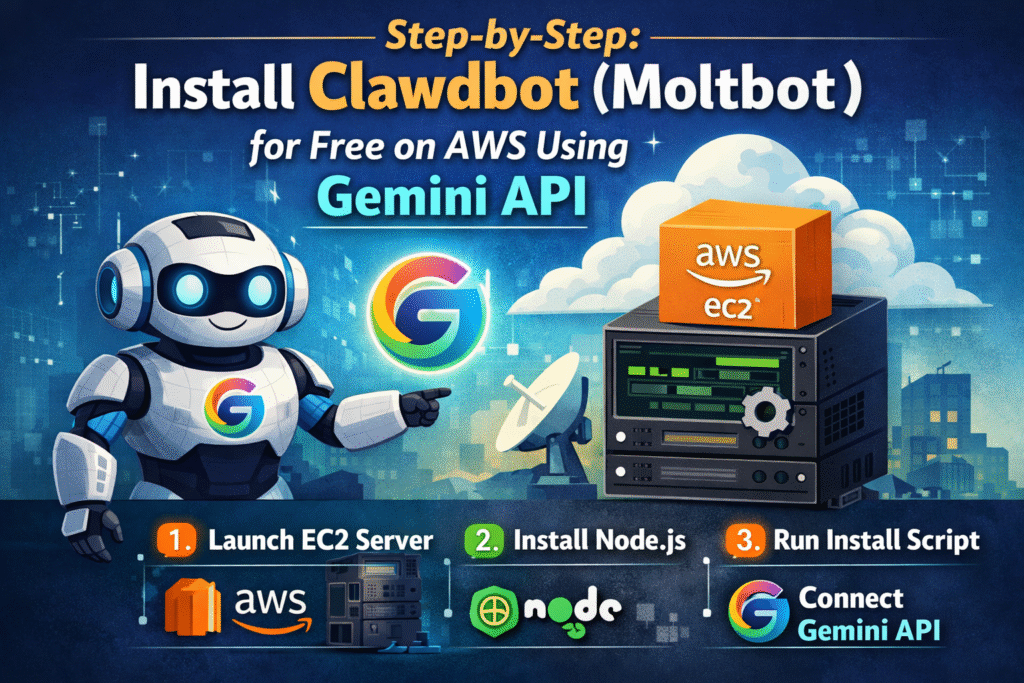
Step 1: Launch an AWS EC2 Ubuntu Server
- Log into AWS Console
- Go to EC2
- Click “Launch Instance”
- Choose Ubuntu Server 22.04 LTS
- Select free-tier eligible instance (t2.micro or t3.micro)
- Create/download key pair
- Launch instance
After launch, connect via SSH:

Step 2: Update the Server
Before installing anything, update your system:
sudo apt update
sudo apt upgrade -y
This ensures all packages are current.
Step 3: Install Node.js (Required)
Clawdbot requires Node.js 22 or higher.
Install using NVM:
curl -o https://raw.githubusercontent.com/nvm-sh/nvm/master/install.sh | bash
source ~/.bashrc
nvm install --lts
Verify installation:
node -v
You should see Node.js 22+.
Step 4: Install Clawdbot / Moltbot
Now run the official installation script: go here : Moltbot
curl -fsSL https://clawd.bot/install.sh | bash
The installer will:
- Detect your OS
- Install required dependencies
- Configure Node if missing
- Prepare Clawdbot environment
Follow on-screen prompts.
Step 5: Configure Gemini API
When prompted for LLM provider:
- Choose custom provider (or Gemini if available)
- Enter your Gemini API key
- Set default model (example: gemini-1.5-pro)
If manual configuration is required, edit the environment file:
nano .env
Add:
LLM_PROVIDER=gemini
GEMINI_API_KEY=your_api_key_here
MODEL=gemini-1.5-pro
Save and exit.
Step 6: Start Clawdbot
Run:
clawdbot start
Or if using Moltbot:
moltbot start
Your AI assistant is now running on AWS.
Step 7: Connect Messaging Platforms
To integrate Telegram, WhatsApp, or Discord:
clawdbot onboard
Follow prompts to:
- Enter Telegram bot token
- Authenticate
- Confirm permissions
Now your AI assistant can respond inside your messaging app.
What Can You Automate?
Once installed, your AI assistant can:
- Send daily summaries
- Automate email sorting
- Scrape websites
- Run browser automations
- Execute system scripts
- Create reminders
- Manage tasks
You can even build advanced workflows like:
- “If new email from client → summarize → send to Slack”
- “Every morning → scrape analytics → send report”
Advanced Configuration Tips
Enable Persistent Memory
Clawdbot supports long-term memory. Configure storage backend (local database or cloud DB).
Add Community Skills
Install community-built skills for:
- Notion integration
- Gmail automation
- Browser control
- File system management
Use PM2 for Production
To keep your bot running permanently:
npm install -g pm2
pm2 start clawdbot
pm2 save
pm2 startup
This ensures auto-restart on reboot.
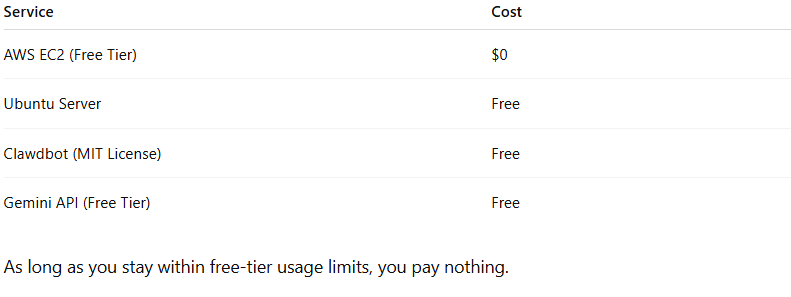
Cost Breakdown (How It’s Free)
Here’s how you keep costs near zero:
Security Best Practices
- Use SSH key authentication only
- Disable password login
- Use firewall rules
- Keep .env file private
- Rotate API keys regularly
- Monitor AWS usage
Why Developers Love Moltbot in 2026
✔ Full control
✔ No SaaS lock-in
✔ Private data
✔ Unlimited customization
✔ Active open-source community
It’s more than a chatbot — it’s a personal AI infrastructure.
Troubleshooting Common Issues
Node version error
Run:
nvm use --lts
Bot not responding
Check logs:
clawdbot logs
API errors
Verify Gemini key and usage quota.
How We Helps You Get the Most Out of Moltbot (Clawdbot)
Clawdbot is incredibly powerful—but without the right setup, security controls, and real-world configuration, most users never unlock its full potential.
At Axiabits, we help businesses, creators, and teams turn Moltbot (Clawdbot) into a fully functional, secure, and purpose-driven AI assistant—not just a tool you test once and forget.
What Axiabits Supports (Without Overcomplicating Things)
- Complete Moltbot / Clawdbot setup
Installation, OpenAI model configuration, and Telegram integration—handled cleanly and safely. - Channel-based AI assistant deployment
AI assistants connected to Telegram, Discord, Slack, or web interfaces, aligned with your daily workflow. - Persona & memory configuration
Setting up your AI to remember context, user preferences, and behave like a real personal assistant. - Skills & automation setup
Only the skills you actually need—configured properly without unnecessary risks. - Security & permission controls
Clear rules on what the AI can do automatically, what needs approval, and what should be restricted. - Use-case focused optimization
Productivity, research, scheduling, automation, or internal workflows—built around your goals, not generic demos.
Why This Matters
Many users install Clawdbot, try it briefly, and stop using it because:
- the setup feels overwhelming
- security isn’t clearly defined
- the AI feels impressive but not practically useful
Axiabits focuses on making AI assistants usable, reliable, and valuable long-term, so they actually support your work instead of becoming another unused experiment.
Book now and let’s get started!
Final Thoughts
Installing Clawdbot (now Moltbot) using Gemini API and AWS gives you:
- A fully autonomous AI assistant
- Zero monthly SaaS fees
- Full data control
- 24/7 uptime
- Advanced automation power
This setup transforms your workflow from manual execution to AI-driven automation.
Whether you’re a developer, tech founder, or productivity enthusiast — this is one of the most powerful free AI systems you can deploy in 2026.
Disclaimer
This article features affiliate links, which indicate that if you click on any of the links and make a purchase, we may receive a small commission. There’s no additional cost to you, and it helps support our blog so we can continue delivering valuable content. We endorse only products or services we believe will benefit our audience.
Frequently Asked Questions
Is Clawdbot completely free?
Yes. It’s open-source under MIT license.
Why was it renamed to Moltbot?
Trademark request related to the name “Claude.”
Can I run it locally instead of AWS?
Yes. Works on macOS, Linux, and Windows (via WSL2).
Does Gemini work well with it?
Yes. Gemini API integrates smoothly and offers a generous free tier.