Running state-of-the-art trillion-parameter AI models on your own hardware once sounded impossible. But with the right optimizations, quantization strategies, and open-source tooling, it’s now achievable—even outside large data centers. Run Kimi K2.5 locally using llama.cpp. Learn hardware requirements, quantization, performance limits, and real-world testing in this hands-on guide.

In this complete hands-on guide, you’ll learn how to run Kimi K2.5 locally using the llama tool.cpp, understand the hardware requirements, explore quantized vs. full-precision trade-offs, and see real-world performance results from actual testing.
If you’re serious about local AI, privacy-first deployments, or experimenting with massive reasoning models, this guide is for you.
What Is Kimi K2.5?
Kimi K2.5 is Moonshot AI’s latest large-scale reasoning model and one of the most ambitious open releases to date.
Key highlights:
- ~1 trillion parameters
- Hybrid reasoning architecture
- Modified DeepSeek V3 Mixture-of-Experts (MoE)
- Native support for extremely long context windows
- Multimodal capabilities with vision encoding
At full precision, Kimi K2.5 is designed for enterprise-grade inference, but thanks to recent breakthroughs in quantization, it can now be tested and explored locally.
Why Run Kimi K2.5 Locally?
Before jumping into the setup, let’s clarify why anyone would attempt this locally:
- Privacy & offline inference
- No API limits or vendor lock-in
- Full control over model behavior
- Research and benchmarking
- Understanding real hardware constraints
That said—local does not mean lightweight. This model still demands serious resources.
Hardware & System Requirements
Tested System Configuration
The setup demonstrated in this guide uses:
- OS: Ubuntu Linux
- GPU: NVIDIA A6000
- VRAM: 48 GB
- CPU: High-core workstation CPU
- Disk Space: ~250 GB minimum
- RAM: 128 GB recommended
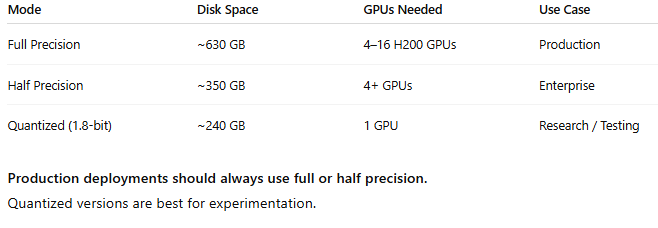
⚠️ Important: This is for the quantized version, not full precision.
Full Precision vs Quantized Reality
Why llama.cpp?
To run Kimi K2.5 locally, we rely on llama.cpp, a highly optimized C++ inference engine that supports:
- GPU & CPU offloading
- Automatic layer distribution
- Custom quantized formats
- Extremely large models
If you haven’t installed it yet, install llama.cpp before proceeding. The setup is straightforward and well-documented.
If you’re new to running AI models locally and want to start with something much lighter before experimenting with trillion-parameter models like Kimi K2.5, it’s worth learning the basics first. We’ve put together a beginner-friendly walkthrough that explains everything step by step — from setup to real-world use cases.
How to Use Moltbot (Clawdbot): A Complete Beginner-Friendly Guide — perfect for understanding local AI workflows before moving on to heavy-weight models.
Downloading the Kimi K2.5 Model
Step 1: Choose the Right Model Version
Since most systems can’t handle the full model, we use the Unsloth dynamic quantized version.
Key benefits:
- Reduces model size from ~600 GB → ~240 GB
- Maintains competitive benchmark performance
- Enables local inference on high-end GPUs
Step 2: Download Model Shards
- Visit the Unsloth Kimi K2.5 Hugging Face page
- Go to Files and Versions
- Locate the UD-TQ1_0 quantization level
- Download all shard files
- Ensure enough disk space before starting
💡 Download failures can happen—just retry the failed shard.
Understanding Unsloth’s Dynamic Quantization
Unsloth doesn’t use basic uniform quantization.
Instead, it applies dynamic quantization, which:
- Assigns higher precision to critical weights
- Uses aggressive compression on less important layers
- Preserves reasoning and coding ability better than traditional methods
This is how they achieve:
- ~60% size reduction
- Acceptable performance for research
- Stable inference without constant hallucinations
Still, quality does degrade, especially for long-form coding tasks.
Running Kimi K2.5 with llama.cpp
Once all shards are downloaded, you can launch the model using llama.cpp.
Key Runtime Configuration Explained
Here’s what happens behind the scenes:
- Environment variable:
Enables minor performance optimizations - Model path:
Points to the first shard of the quantized model - Sampling parameters:
- Temperature: 1.0 (reduces repetition)
- Min-P: 0.1 (filters unlikely tokens)
- Top-P: 0.95 (nucleus sampling)
- Temperature: 1.0 (reduces repetition)
- Context size:
- Default: 16K
- Theoretical max: 256K
- Default: 16K
- –fit-on flag:
Automatically distributes layers across GPU & CPU memory
If VRAM is limited, llama.cpp allows manual layer offloading using regex patterns.
Model Loading Time & Resource Usage
Real-World Observations
- Initial load time: ~25 minutes
- VRAM usage: ~47–48 GB
- CPU usage: Moderate
- System RAM: High but manageable
- Virtual memory: Partially used
This confirms that most computation is GPU-bound, which is ideal for inference stability.
Performance Testing: Can It Actually Code?
To test real-world usefulness, a simple coding task was issued:
“Create a Space Invaders game in HTML.”
Results:
- Generation speed: ~3–8 tokens/sec
- Total generation time: ~90 minutes
- Code completeness: Partial
- UI generated: Yes
- Game functionality: Broken controls
Key Takeaways:
- No infinite loops
- No hallucination spirals
- Logical structure present
- Low-bit quantization limits execution accuracy
This is expected behavior at 1.8-bit quantization.
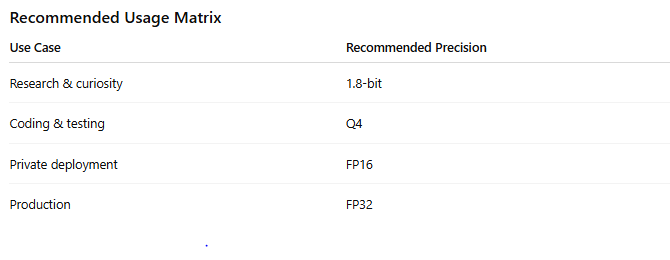
When Should You Use Higher Quantization?
If you want:
- Functional code
- Better reasoning
- Less output corruption
👉 Use Q4 or higher, assuming your VRAM allows it.
Known Limitations
Let’s be honest—this setup has real trade-offs:
- Extremely slow inference
- Long load times
- High hardware cost
- Not production-safe at low precision
- Coding tasks often incomplete
But still…
👉 Running a trillion-parameter reasoning model locally is wild.
Should You Run Kimi K2.5 Locally?
Yes, if you:
- Want full control
- Care about privacy
- Have high-end hardware
- Are doing research or benchmarking
No, if you:
- Need fast responses
- Want production reliability
- Don’t have ≥48 GB VRAM
How We Help With Private & Local AI Deployments
Running large AI models like Kimi K2.5 locally isn’t just about downloading weights—it requires the right architecture, hardware planning, and performance tuning to actually make it usable.
This is where Axiabits steps in.
What We Do
We help teams, founders, and agencies design and deploy private, offline, and high-performance AI systems, tailored to their exact use case.
Our services include:
- Local LLM Deployment
Setup and optimization of large models using llama.cpp and similar inference engines. - GPU & Infrastructure Planning
Guidance on VRAM, RAM, storage, and multi-GPU configurations to avoid costly mistakes. - Quantization & Performance Tuning
Choosing the right precision (Q4, FP16, FP32) for speed, accuracy, and stability. - Offline & Private AI Solutions
Secure, internet-free AI deployments for sensitive or regulated environments. - Custom AI Workflows
From coding assistants to research pipelines, built around your real-world needs.
Who This Is For
- Businesses needing private AI inference
- Teams experimenting with large reasoning models
- Agencies building AI-powered products
- Founders exploring on-prem AI alternatives to cloud APIs
Ready to Build Your Own AI Stack?
If you’re planning to experiment with local AI or want a production-ready private deployment, we’ll help you do it the right way—without trial-and-error or wasted hardware spend.
Book now and let’s get started!
Final Thoughts
Kimi K2.5 represents a major step forward in open, large-scale reasoning models. While full-precision deployments remain enterprise-only, quantization + llama.cpp opens the door for serious experimentation on local hardware.
It’s slow. It’s heavy. It’s imperfect.
But it works—and that alone is impressive.
If you’ve been waiting to explore trillion-parameter AI without relying on APIs, now you know exactly how to do it.
Disclaimer
This article features affiliate links, which indicate that if you click on any of the links and make a purchase, we may receive a small commission. There’s no additional cost to you, and it helps support our blog so we can continue delivering valuable content. We endorse only products or services we believe will benefit our audience.
Frequently Asked Questions
What is Kimi K2.5?
Kimi K2.5 is a large-scale hybrid reasoning model developed by Moonshot AI. It uses a modified Mixture-of-Experts (MoE) architecture and contains close to one trillion parameters, making it one of the most powerful open reasoning models currently available.
Can Kimi K2.5 really be run locally?
Yes, Kimi K2.5 can be run locally using llama.cpp, but only with quantized versions unless you have enterprise-grade hardware. Full-precision inference requires multiple high-end GPUs and hundreds of gigabytes of disk space.
What is Unsloth quantization and why is it used?
Unsloth uses dynamic quantization, which reduces the model’s size by lowering weight precision while preserving critical parameters. This allows Kimi K2.5 to shrink from ~600 GB to ~240 GB, making local inference possible on high-end consumer or workstation GPUs.
Is the quantized version suitable for production use?
No. Quantized versions, especially low-bit (1.8-bit) models, are not recommended for production. They may produce hallucinations, incorrect logic, or incomplete code. Production deployments should use full or half-precision models.
How long does it take to load Kimi K2.5 locally?
Loading the quantized model can take 20–30 minutes, depending on disk speed, GPU memory, and system configuration. This is normal due to the model’s size.