

Clawdbot (also known by many as Moltbot) is everywhere right now—and for good reason. People are using it to automate daily tasks, control their homes, manage workflows through chat apps, and even save thousands of dollars by making smarter decisions with AI assistance.
If you’ve seen what others are building with Clawdbot and thought:
“This looks amazing… but I have no idea where to start.” Understand why most AI tools fail in real-world usage and how ClawdBot delivers consistent, always-on AI performance without the usual limitations.
You’re in the right place.
This complete beginner-friendly guide will walk you step by step through what Clawdbot is, how it works, and how you can set it up without deep technical knowledge. By the end of this guide, you’ll have your own personal AI assistant running—connected to Telegram and ready to help you from anywhere.
What Is Moltbot (Clawdbot)?
Clawdbot is an agentic AI system. That means it doesn’t just answer questions—it can take actions on your behalf.
At its core, Clawdbot acts as a brain that connects to channels you already use daily, such as:
- Telegram
- Discord
- WhatsApp
- Slack
Instead of learning a new app or dashboard, you interact with Clawdbot through chat—just like texting a friend. Behind the scenes, it can execute commands, store memory, automate tasks, and even interact with your computer or server (depending on how you configure it).
This is why people call Clawdbot a personal AI assistant, not just a chatbot.
Why Beginners Feel Overwhelmed (And Why You Don’t Have To)
Most people don’t struggle with what Clawdbot can do—they struggle with how to set it up.
Common beginner fears include:
- “I’m not technical enough”
- “What if I break something?”
- “I don’t understand terminals or commands”
- “Is this safe to run on my computer?”
The good news?
Clawdbot provides a Quick Start setup wizard that removes most of the complexity. You don’t need to code, and you don’t need advanced system knowledge to get started.
This guide focuses on the easiest possible setup, using:
- A local installation
- OpenAI as the AI model provider
- Telegram as the communication channel
How Clawdbot Works (Simple Explanation)
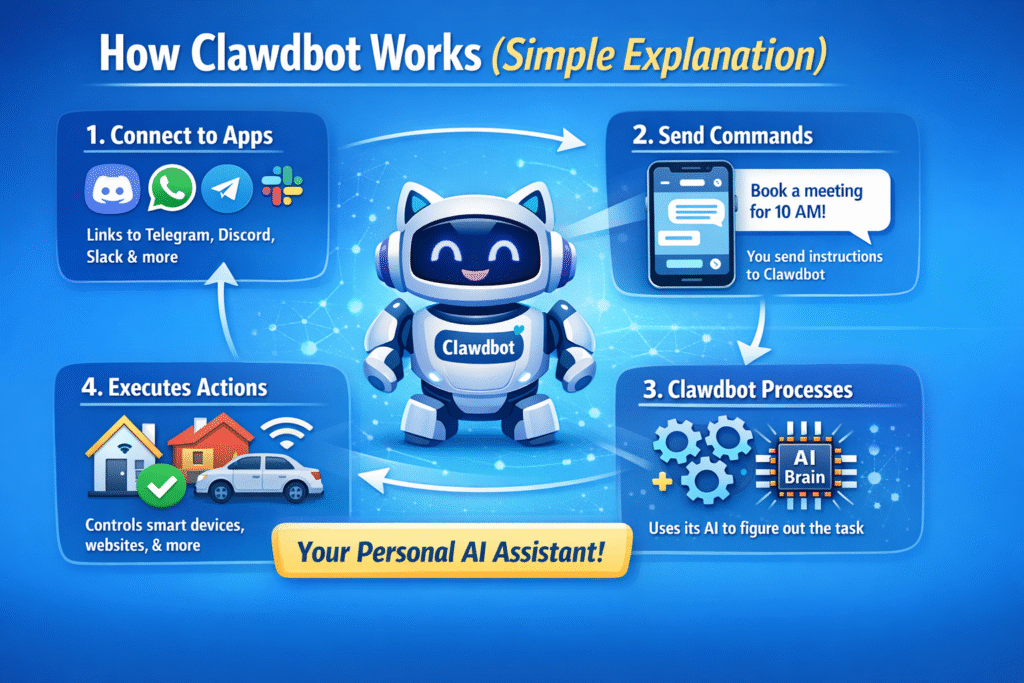
Think of Clawdbot as three layers:
- The Brain
This is the AI model (like OpenAI) that thinks and responds. - The Channels
These are where you talk to it—Telegram, Discord, web UI, or terminal. - The Skills
These allow Clawdbot to actually do things—run commands, schedule jobs, manage files, or interact with other apps.
Once these three layers are connected, Clawdbot becomes a powerful assistant that remembers information and executes tasks for you.
Many AI tools sound impressive on paper, but fail when it comes to real-world, continuous usage. If you want to understand why ClawdBot stands apart from typical AI hype and actually works around the clock, check out our in-depth guide on AI Hype vs Reality: Why ClawdBot Is the First AI That Actually Works 24/7. In that article, we break down how ClawdBot delivers consistent performance, handles real tasks, and stays reliable even when most AI assistants fall short.
Step 1: Installing Clawdbot Locally
To begin, head to the official Clawdbot website and scroll down to the Quick Start section.
You’ll see a single command. This command is all you need to install Clawdbot.
How to Run the Install Command
- Open your terminal
- On Mac: Press Command + Space, type Terminal, and hit Enter
- On Mac: Press Command + Space, type Terminal, and hit Enter
- Paste the Quick Start command
- Press Enter
That’s it.
Clawdbot will now begin installing automatically. This process may take a few minutes, so don’t worry if it looks like it’s “thinking.”
Important Safety Note
Clawdbot runs locally on your computer, which means:
- It can execute commands
- It can access certain files
- It is extremely powerful
There are safety guards in place, but you should always be aware of what you’re installing. If you want to inspect what the command does, you can open the downloaded file in your browser and review it.
Step 2: The Setup Wizard (Quick Start Mode)
Once installation finishes, Clawdbot launches a setup wizard inside the terminal.
This wizard walks you through everything.
Key Choices You’ll Make:
- Acknowledge the risk (required to continue)
- Choose Quick Start (recommended for beginners)
- Select a model provider
- Set up a communication channel
If you’re new, always choose Quick Start. Manual setup is for advanced users only.
Step 3: Choosing the AI Model (OpenAI Setup)
Clawdbot needs an AI model to function. For beginners, OpenAI is the easiest option.
How to Create an OpenAI API Key
- Go to the OpenAI platform
- Navigate to API Keys
- Click Create New Secret
- Name it anything (for example: “Clawdbot”)
- Set permissions to restricted
- Copy the key
Paste this key into the Clawdbot wizard when prompted.
Choosing a Model
You’ll also be asked to select a model.
For most users:
- GPT-4.1 or newer models work great
- Avoid reasoning-heavy models at first
Once selected, Clawdbot now has its “brain.”
Step 4: Connecting Clawdbot to Telegram
Telegram is one of the easiest and most flexible ways to use Clawdbot from anywhere.
Creating a Telegram Bot
- Open Telegram
- Search for BotFather
- Type /newbot
- Choose a name and username
- Copy the bot token provided
Paste this token into the Clawdbot setup when prompted.
Step 5: Securing Your Bot (Very Important)
Without protection, anyone with your bot link could talk to your AI.
Clawdbot solves this with user whitelisting.
How Whitelisting Works
- You copy your Telegram User ID
- Paste it into Clawdbot’s channel settings
- Save changes
Now, only you can interact with your Clawdbot. Everyone else is blocked.
Step 6: Accessing Clawdbot (Multiple Ways)
Once setup is complete, you can access Clawdbot through:
- Telegram
- Web UI (local IP + port)
- Terminal interface
This means you can:
- Chat from your phone
- Use it on your computer
- Control it remotely (as long as your system is online)
Step 7: Giving Clawdbot Memory and a Persona
The first time Clawdbot comes online, it will ask:
“Who am I? And who are you?”
This is where things get fun.
You can define:
- Its name
- Its role
- Your name
- How it should behave
Example:
“You are Lisa, my personal AI assistant. My name is Alex.”
Clawdbot stores this information in memory files, allowing it to remember context across conversations.
Step 8: Understanding Skills (Where the Real Power Is)
Skills are what turn Clawdbot from a chatbot into a real assistant.
With skills, Clawdbot can:
- Schedule recurring tasks
- Run terminal commands
- Automate workflows
- Interact with apps and files
- Execute system actions (with approval)
Beginner Advice on Skills
- Skip skills during initial setup
- Add them gradually later
- Always review permissions
- Avoid installing skills you don’t understand
Security Controls You Should Know About
Clawdbot allows granular permission control, including:
- What actions require approval
- What actions are denied outright
- What the AI can do autonomously
For anything security-related, always set it to:
- Ask
- Deny
- Fallback
Never give full unrestricted access unless you fully trust the setup.
Can You Use Clawdbot Without Telegram?
Yes.
Clawdbot also works via:
- Web UI
- Terminal interface
- Other chat platforms
Telegram is simply the most beginner-friendly option.
How Axiabits Helps You Get the Most Out of Moltbot (Clawdbot)
Clawdbot is incredibly powerful—but without the right setup, security controls, and real-world configuration, most users never unlock its full potential.
At Axiabits, we help businesses, creators, and teams turn Moltbot (Clawdbot) into a fully functional, secure, and purpose-driven AI assistant—not just a tool you test once and forget.
What Axiabits Supports (Without Overcomplicating Things)
- Complete Moltbot / Clawdbot setup
Installation, OpenAI model configuration, and Telegram integration—handled cleanly and safely. - Channel-based AI assistant deployment
AI assistants connected to Telegram, Discord, Slack, or web interfaces, aligned with your daily workflow. - Persona & memory configuration
Setting up your AI to remember context, user preferences, and behave like a real personal assistant. - Skills & automation setup
Only the skills you actually need—configured properly without unnecessary risks. - Security & permission controls
Clear rules on what the AI can do automatically, what needs approval, and what should be restricted. - Use-case focused optimization
Productivity, research, scheduling, automation, or internal workflows—built around your goals, not generic demos.
Why This Matters
Many users install Clawdbot, try it briefly, and stop using it because:
- the setup feels overwhelming
- security isn’t clearly defined
- the AI feels impressive but not practically useful
Axiabits focuses on making AI assistants usable, reliable, and valuable long-term, so they actually support your work instead of becoming another unused experiment.
Book now and let’s get started!
Final Thoughts: Is Moltbot (Clawdbot) Worth It?
Absolutely—if used responsibly.
Clawdbot is not just another AI chatbot. It’s a powerful personal assistant capable of real-world action, memory, and automation.
For beginners:
- Start simple
- Use Quick Start
- Stick to Telegram
- Add skills slowly
- Always respect security boundaries
Once you’re comfortable, the possibilities are genuinely wild.
You’re no longer just chatting with AI—you’re building with it.
Disclaimer
This article features affiliate links, which indicate that if you click on any of the links and make a purchase, we may receive a small commission. There’s no additional cost to you, and it helps support our blog so we can continue delivering valuable content. We endorse only products or services we believe will benefit our audience.
Frequently Asked Questions
What is Moltbot (Clawdbot)?
Moltbot, also known as Clawdbot, is an agentic AI system that works as a personal AI assistant. Unlike traditional chatbots, it can execute actions, remember information, and interact with tools, files, and apps through chat platforms like Telegram, Discord, and Slack.
Is Moltbot (Clawdbot) free to use?
Clawdbot itself is open-source and free to install. However, you may need paid API keys (such as OpenAI) depending on the AI model you choose. The total cost depends on how frequently you use the AI and which services you connect.
Do I need coding skills to use Clawdbot?
No. Beginners can fully set up Clawdbot using the Quick Start wizard without writing any code. Advanced features like custom skills or automations may require technical knowledge, but they are completely optional.
Is Moltbot safe to install on my computer?
Clawdbot runs locally on your computer, which makes it powerful but also requires responsibility. It includes built-in safeguards and approval controls, but users should carefully manage permissions and only install skills they trust.
Can I use Moltbot from my phone?
Yes. When connected to Telegram, you can chat with Clawdbot from your phone anytime, as long as your computer or server hosting it is online and connected to the internet.


