

Introduction
Designing a modern website UI used to require hours of wireframing, planning, and layout experimentation. Today, AI-powered tools are changing the workflow completely. One of the most powerful tools in this space is Relume AI, which allows designers and developers to generate sitemaps, wireframes, and UI structures in minutes. Want to design websites faster? Learn how to use Relume AI to generate UI, build sitemaps, and create wireframes with this easy step-by-step guide.

If you’re a designer, developer, or marketer looking to speed up the UI design process, this guide will show you how to use Relume AI to generate UI quickly and efficiently.
In this article, you’ll learn:
- What Relume AI is
- Key features of Relume AI
- Step-by-step process to generate UI using Relume
- How to edit and refine designs
- Exporting designs to Figma and Webflow
- Pros and limitations of Relume AI
Want to generate professional website wireframes in minutes? Join Relume AI today and let AI create your sitemap and UI layouts instantly. It’s the perfect tool for designers, developers, and startups looking to speed up website planning.
What is Relume AI?
Relume AI is an AI-powered website design tool that helps users quickly generate website sitemaps and wireframes from simple text prompts.
Instead of manually creating UI structures, you can simply describe your website idea, and Relume will generate:
- A full website sitemap
- Wireframes for each page
- Pre-built UI components
- Structured layout ready for design tools like Figma or Webflow
This makes Relume especially useful during the early phase of website design, when you’re planning the structure and layout of a website.
Why Designers Use Relume AI for UI Generation
Relume stands out from other AI website builders because it focuses on structured design generation instead of random layouts. If you want to simplify your UI design process, try Relume AI now. With AI-powered sitemap and wireframe generation, you can turn your website ideas into structured layouts within seconds.
Here are some of the main reasons designers use Relume:
1. Rapid UI Structure Generation
Relume can generate a complete website layout within about one minute, saving hours of manual work.
Instead of drawing every section manually, AI generates:
- Homepage layout
- Feature sections
- Pricing sections
- Contact pages
- About pages
All in seconds.
2. Smart Sitemap Creation
Unlike many AI design tools that start directly with visual designs, Relume begins with sitemap generation.
This is actually a huge advantage because it ensures your UI structure is logically organized before visual design begins.
3. Powerful Component Library
Relume includes a large component library containing dozens of UI components such as:
- Hero sections
- Feature blocks
- Testimonials
- Pricing tables
- CTA sections
- Navigation bars
Each component also includes multiple variants, giving designers flexibility.
4. Better Prompt Accuracy
Compared to many AI design tools, Relume is much better at interpreting prompts.
When you describe a product or landing page idea, the generated sitemap and wireframe usually reflect the concept accurately.
Step-by-Step Guide: How To Use Relume AI To Generate UI
Let’s walk through the complete process of creating a UI layout using Relume AI. Stop spending hours creating wireframes manually. Sign up for Relume AI and generate website structures, landing pages, and UI components with just a simple prompt.
Step 1: Provide a Design Prompt
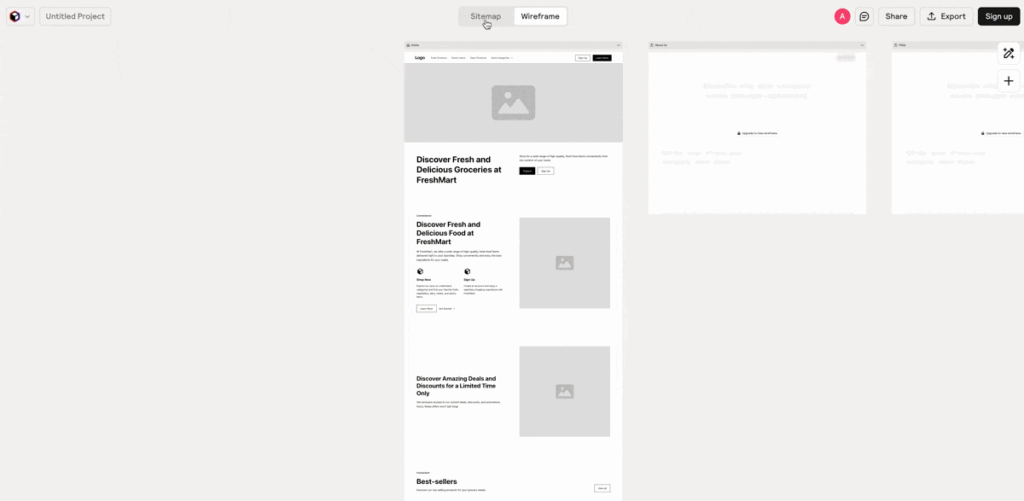
The first step is to tell Relume what type of website you want to create.
Simply enter a prompt describing your website.
Example prompt:
Create a landing page for an AI productivity tool with sections for features, pricing, testimonials, FAQ, and signup.
Once you enter the prompt, Relume starts generating the website structure.
What Happens Next?
Relume first creates a Sitemap instead of jumping straight to visual design.
The sitemap includes pages like:
- Home
- Features
- Pricing
- About
- Contact
- Blog
This helps organize the website structure logically.
Generation usually takes around one minute.
Step 2: Switch Between Sitemap and Wireframe Views
Once the sitemap is generated, you can switch between two views:
Sitemap View
The sitemap shows the structure of your website pages.
It displays how different pages connect together, giving you a clear overview of the entire site architecture.
Wireframe View
The wireframe view shows the actual UI layout for each page.
This includes sections such as:
- Hero section
- Features grid
- Testimonials
- CTA blocks
- Footer
One of Relume’s best features is that both views are connected.
If you change something in the sitemap, the wireframe updates automatically.
This synchronization makes editing extremely efficient.
Step 3: Regenerate Designs If Needed
Like most AI tools, Relume also allows you to regenerate designs.
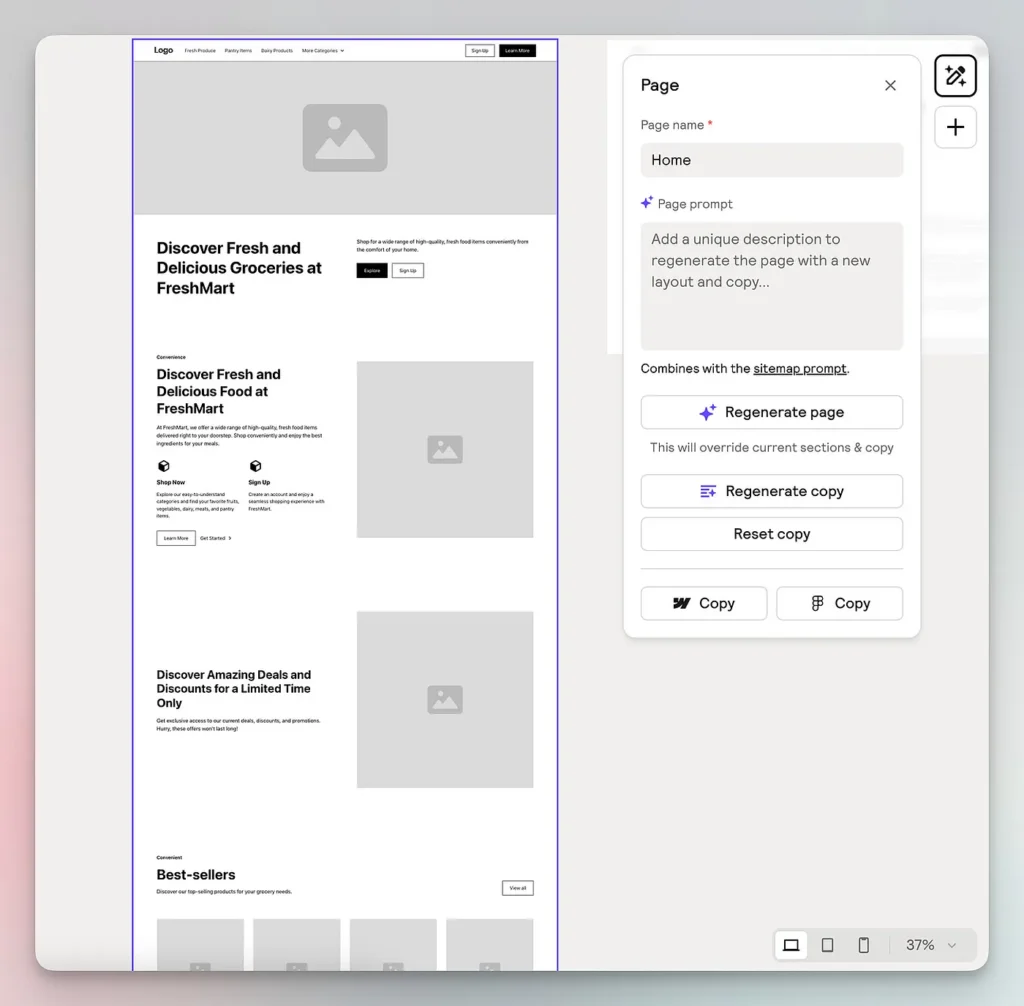
If you’re not satisfied with the first result, you can simply click Regenerate.
This will produce a new layout based on the same prompt.
You can also modify your prompt to get better results.
Example improved prompt:
Create a SaaS landing page with hero section, product demo video, feature comparison, pricing table, testimonials, FAQ, and signup form.
Better prompts usually produce more accurate UI structures.
If you’re planning to build your website using Webflow, creating a proper style guide is an important step for maintaining consistent design across your pages. Our detailed guide on Set Up Your Webflow Style Guide With Relume explains how you can quickly generate a structured style system using Relume components and organize your typography, colors, and layouts efficiently. This approach helps designers and developers save time while building scalable Webflow websites.
Step 4: Edit the Generated UI
After generating the sitemap and wireframe, the next step is editing.
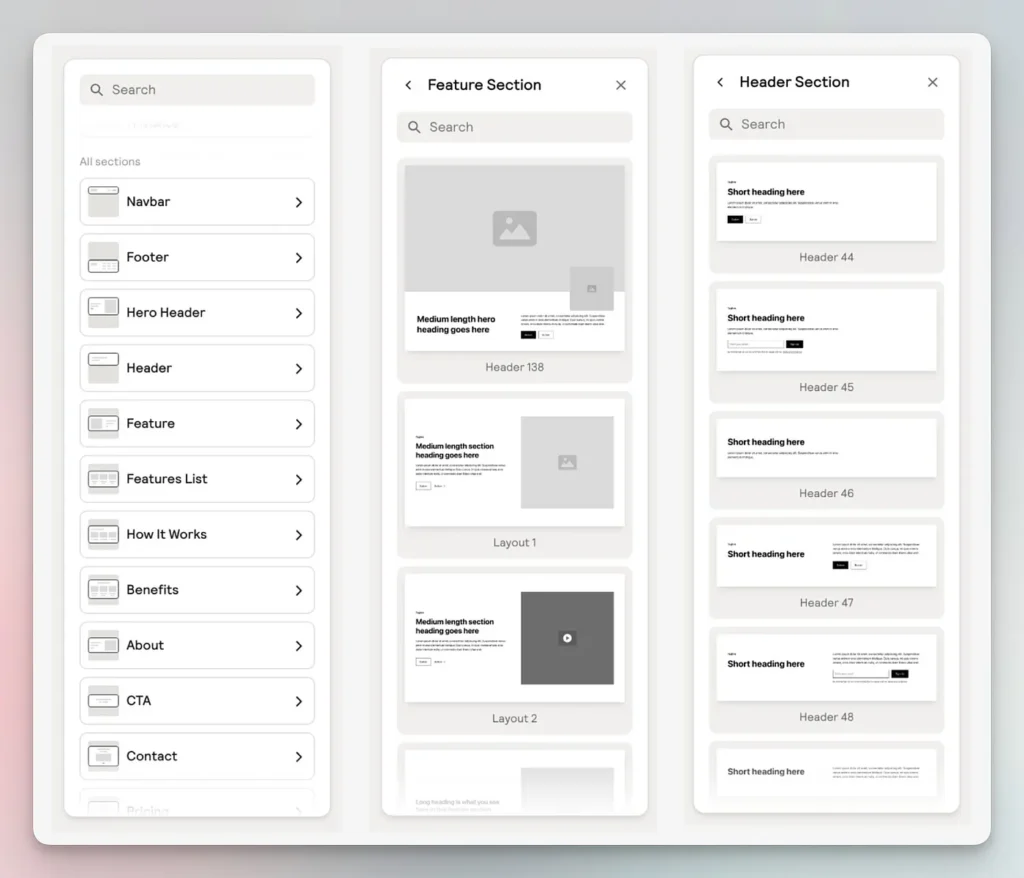
Relume provides two ways to edit your design.
Option 1: Edit UI Inside Relume
Relume includes a large component library, allowing you to modify your wireframe directly.
Each section in your wireframe can be replaced with different component variants.
For example:
A hero section can be replaced with:
- Video hero
- Image hero
- Split hero layout
- Centered headline hero
One impressive feature is the hover preview system.
When you hover over a component, Relume shows a live preview before inserting it.
This makes experimenting with layouts much easier.
Option 2: Edit UI Outside Relume
While Relume is powerful for wireframing, it is not designed for the final stages of design.
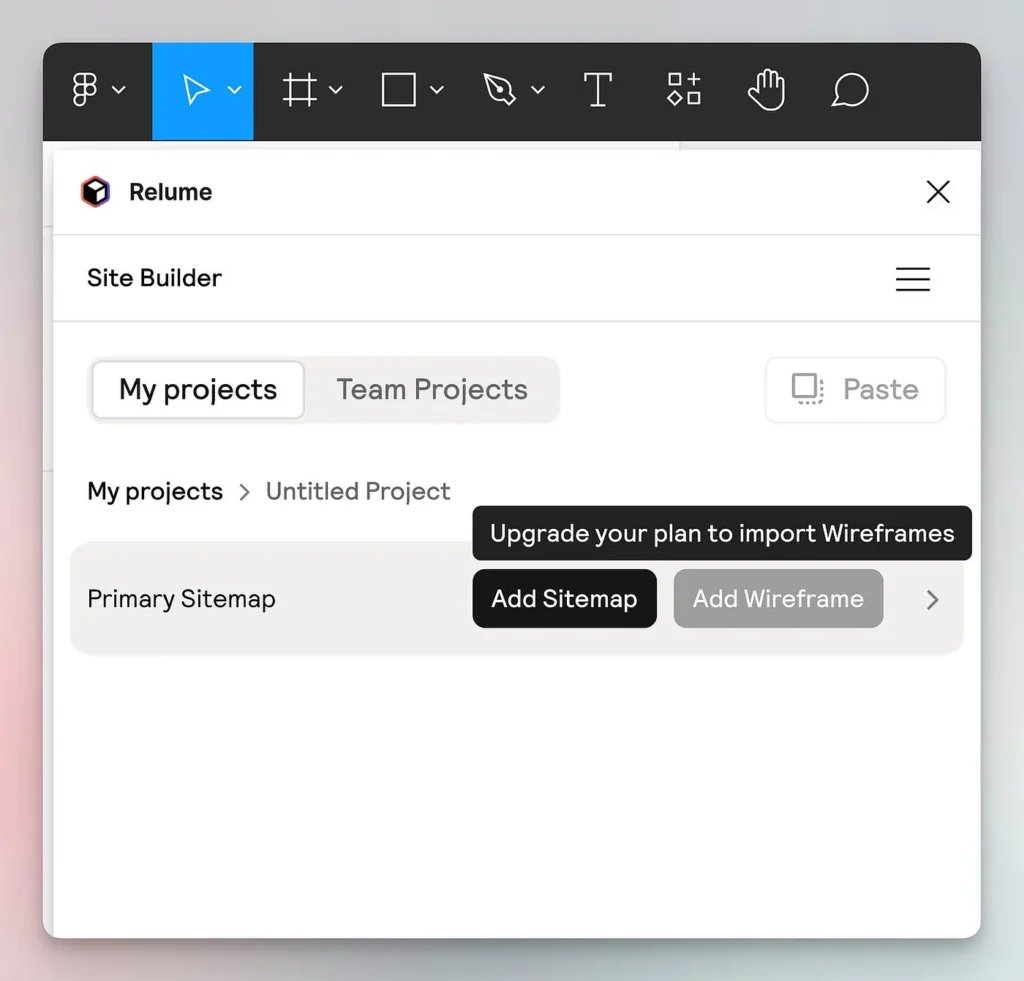
For advanced editing, you can export your design to professional tools such as:
- Figma
- Webflow
These tools allow you to refine the UI further and prepare it for production.
Step 5: Export to Figma or Webflow
Relume includes exporting functionality to integrate with popular design platforms.
Exporting to Figma
To export your sitemap to Figma:
- Create a Relume account
- Install the Relume Figma Plugin
- Connect your Relume project
- Click export
Within seconds, your sitemap appears in Figma.
The exported components include Auto Layout, making them easy to edit.
This is extremely useful for designers who want to refine layouts in Figma.
Exporting Wireframes
However, exporting wireframes usually requires a paid Relume plan.
Free users may see the option greyed out. Relume AI makes it incredibly easy to transform your ideas into real website layouts. Create your free Relume account today and start generating powerful UI structures instantly.
Pros of Using Relume AI
Relume offers several advantages for UI generation.
1. Extremely Fast UI Creation
What used to take hours can now be done in minutes.
2. Accurate Prompt Interpretation
Relume understands prompts better than many AI website builders.
3. Linked Sitemap and Wireframes
This unique feature allows edits in one view to update the other automatically.
4. Large Component Library
Dozens of design components give users flexibility.
5. Seamless Figma Export
Designers can easily continue editing inside Figma.
If you want to continue editing your AI-generated wireframes in a professional design tool, exporting your project to Figma is the best option. In our guide How To EXPORT Relume To Figma (QUICK & EASY) 2026, you’ll learn the fastest way to transfer your Relume sitemap and components into Figma so you can refine layouts, customize UI elements, and prepare your design for development.
Tips to Get Better UI Results with Relume
To get the best results, follow these tips:
Write Detailed Prompts
The more detailed your prompt, the better the UI structure.
Bad prompt:
SaaS website
Good prompt:
SaaS landing page with hero section, product demo video, features grid, pricing plans, testimonials, FAQ, and signup form.
Regenerate Multiple Versions
Sometimes the second or third generation produces the best design.
Combine With Figma
Use Relume for structure, then refine design in Figma.
Need Help Designing Your Website UI Faster?
Axiabits create a professional website UI can take a lot of time, especially when planning sitemaps, wireframes, and user experience. If you want to speed up your website design process or need help turning AI-generated wireframes into a fully functional website, our team can help you do it the right way.
Our Web Design & AI Integration Services
UI/UX Design & Wireframing
We help businesses design modern and user-friendly interfaces, including sitemaps, wireframes, and complete UI layouts for websites and apps.
Website Design & Development
From landing pages to full business websites, we build responsive and high-converting websites tailored to your brand and goals.
AI Tools Integration
Want to use tools like Relume, AI automation, or design tools in your workflow? We help integrate AI-powered solutions to make your design and development process faster.
Website Optimization & Performance
We also optimize websites for speed, SEO, and better user experience so your site performs well on search engines and converts more visitors.
Ready to Build Your Next Website?
If you want a professionally designed website or need help turning your AI-generated wireframes into a real website, our team is ready to help.
👉 Book a Call Today and Let’s Build Your Website the Smart Way.
Final Thoughts
Relume AI is one of the most powerful tools available for AI-assisted UI generation.
Its ability to generate sitemaps and wireframes from simple prompts makes it extremely useful for designers, developers, and startups.
While it isn’t meant for final design stages, it excels at early website planning, saving hours of manual work.
With features like linked sitemap and wireframe views, component libraries, and Figma export, Relume provides a streamlined workflow for modern UI design.
Ready to design smarter? Get started with Relume AI today and automatically generate website sitemaps, wireframes, and layouts that you can export directly to Figma or Webflow.
Disclaimer
This article features affiliate links, which indicate that if you click on any of the links and make a purchase, we may receive a small commission. There’s no additional cost to you, and it helps support our blog so we can continue delivering valuable content. We endorse only products or services we believe will benefit our audience.
Frequently Asked Questions
What is Relume AI used for?
Relume AI is an AI-powered website design tool used to quickly generate website sitemaps, wireframes, and UI layouts from simple text prompts. It helps designers and developers plan website structure before moving into full design or development.
Can Relume AI generate a full website design?
Relume AI primarily focuses on the early stages of website design, such as creating sitemaps and wireframes. For final visual design and development, users usually export the project to tools like Figma or Webflow.
Is Relume AI free to use?
Yes, Relume AI offers a free plan, but it comes with limited features. Some advanced options like exporting full wireframes or accessing premium components may require a paid subscription.
Can beginners use Relume AI?
Yes, beginners can easily use Relume AI because it works with simple text prompts. Just describe the type of website you want, and the AI will automatically generate the sitemap and UI wireframes.
Does Relume AI integrate with other tools?
Yes, Relume integrates with popular design tools like Figma and Webflow, allowing designers to export their sitemap or wireframe and continue editing or developing the website.


