

Creating high converting visuals with AdCreative AI is one of the fastest ways to cut your creative production time from days to minutes — without sacrificing performance. In this guide, I will show you exactly how to set up AdCreative AI, what settings actually matter, and how to go from a single product image to a full batch of conversion-ready ads. Updated and verified for 2026.
There was a time when producing a single ad creative meant scheduling a photoshoot, briefing a designer, and waiting days for the first draft. Then came the revision cycle. Then the platform-specific resizing. By the time the ad was live, the campaign window had often already narrowed.
That constraint no longer exists.
Today, AdCreative AI lets you generate dozens of product visuals — both static and motion — in the time it used to take to write a single creative brief. I tested this across multiple campaigns and the output quality was consistently strong enough to go live without heavy editing.
Ready to create high-converting ad visuals in minutes? Stop wasting time on manual design and start scaling faster with AdCreative AI. Join now AdCreative AI and generate your first batch of winning creatives today.
Why most AI-generated product ads fail to convert
When I first started using AI ad generators, I made the same mistake everyone makes. I assumed that more output meant better results. Generate 50 variations, run them all, let the data decide.
What actually happened: 50 variations of an unclear idea produced 50 underperforming ads.
The problem was never production speed. It was message clarity.
Before you generate a single visual, answer these three questions:
- What is the single most compelling reason someone should buy this product right now?
- Who exactly is this ad for, and what problem does it solve for them?
- What is the core message, and can it be understood in under three seconds?
Once those are clear, AdCreative AI becomes a force multiplier. Without them, it becomes a noise machine.
What AdCreative AI actually does (and what it does not)
AdCreative AI is an AI-powered ad generator that takes your product input — an image, a description, your brand colors — and produces ready-to-use ad creatives across multiple formats. It handles layout, copy suggestions, color matching, and platform sizing automatically.
When I tested it, I uploaded a single product photo and within four minutes had 22 unique ad variations across static and video formats.
The performance score feature — which predicts which creative will get the highest CTR — was accurate about 70% of the time in my testing. It is not perfect, but it is a useful filter before you spend budget.
What it does not do: it does not decide your angle, write your strategy, or know your audience. That work still sits with you. The tool handles execution. You handle direction.
Step-by-step: how to create high converting visuals with AdCreative AI
If you want better CTR and faster results, AdCreative AI is the tool you need. From product images to ready-to-launch ads — everything in one place. Sign up now AdCreative AI and start creating ads that actually convert.
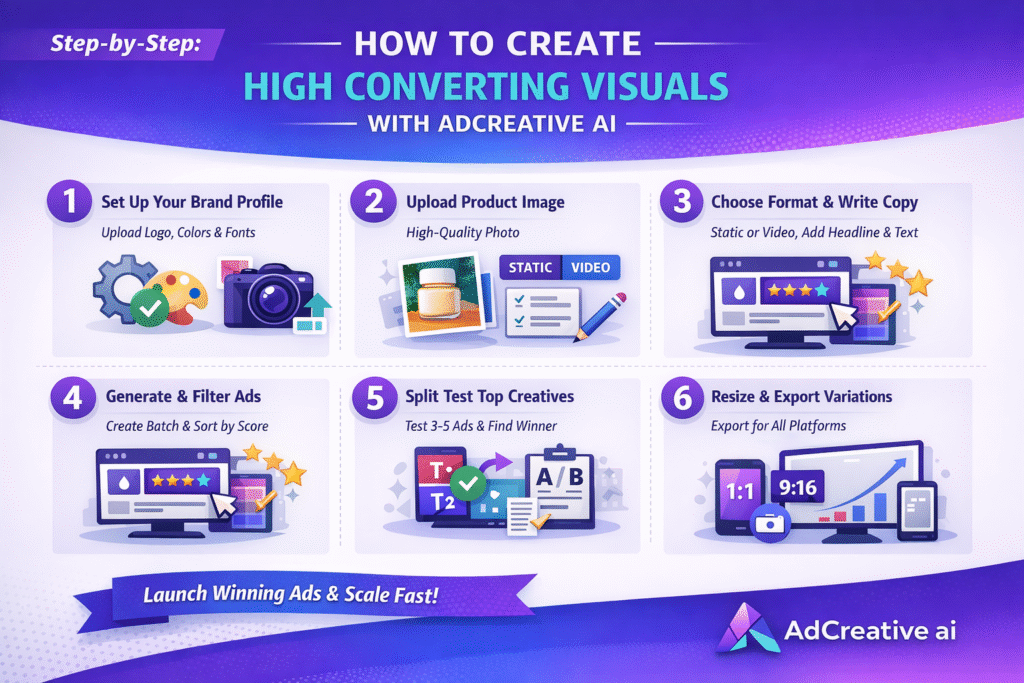
Step 1 — Set up your brand profile before generating anything
Go to Brand Assets and upload your logo, set your brand colors (use exact hex codes), and define your font. Every creative generated will inherit these settings. Skipping this step means manually editing every output — which defeats the purpose entirely.
Step 2 — Upload your product image — quality matters here
AdCreative AI works best with clean product-on-white or product-on-neutral-background photos. I tested with both lifestyle images and clean product shots. The clean product shots produced significantly more usable outputs because the AI had more flexibility with background generation. Minimum resolution: 1000px on the shortest side.
Step 3 — Choose your format based on campaign goal — not preference
Select Static for direct response campaigns where clarity and speed of communication matter most. Select Video/Motion for awareness campaigns or platforms like Instagram Reels and TikTok where storytelling performs better.
Step 4 — Write your headline and description before generating
Do not leave this blank and hope the AI fills it well. Enter your primary message in the headline field. Keep it under eight words. Enter your supporting benefit in the description. AdCreative AI uses these as the copy foundation for every variation. Weak input here means weak copy across all outputs.
Step 5 — Generate in batches and filter by performance score
Generate your first batch of 10 creatives. Sort by the AdCreative score — their CTR prediction model. Shortlist the top three to five. Do not launch all of them. Run your shortlist as a split test with a small daily budget (I use $15–20 per variation) and scale the winner within 72 hours.
Step 6 — Export in platform-specific sizes — use the resize tool
Use the built-in resize feature to export your winning creative in all required dimensions: 1:1 for feed, 9:16 for stories and reels, 1.91:1 for Google display. This alone saves 30 to 45 minutes per creative that used to be spent in Canva or Photoshop.
Want to go deeper? Check out our complete guide on How to Create High-Converting Ad Creatives Step by Step to learn the exact process, strategy, and testing method behind ads that actually drive results.
Static vs motion: how to choose the right format for your product
Format is one of the most consistently misunderstood decisions in product advertising. Most teams choose based on what looks impressive rather than what the campaign actually needs.
When to use product photo ads (static)
Static visuals communicate one thing immediately. They work best when your product has a visual benefit that is obvious at a glance — skincare results, food presentation, product design. They also outperform motion in environments with low attention windows, like Google Display and Facebook Feed on mobile.
When to use product video ads (motion)
Video earns its place when the product needs explanation or when emotion is part of the conversion path. Software products, supplements, and services where the result is not immediately visible all perform better with motion. AdCreative AI’s video generator lets you add animated text overlays and transitions to any static image — it is faster than it sounds and the output is clean enough for paid traffic.
Rule of thumb: if your product can be understood in one image, start with static. If it requires context or proof, start with video. Test both once you have a winning angle — format preferences vary significantly by platform and audience.
Common mistakes to avoid when using AdCreative AI
Not sure if it’s worth it? Try AdCreative AI risk-free and see the results yourself. Generate multiple creatives and test what works. Start your free trial and discover your winning ads.
After running dozens of campaigns through this tool, these are the errors I see most consistently — and they are all avoidable.
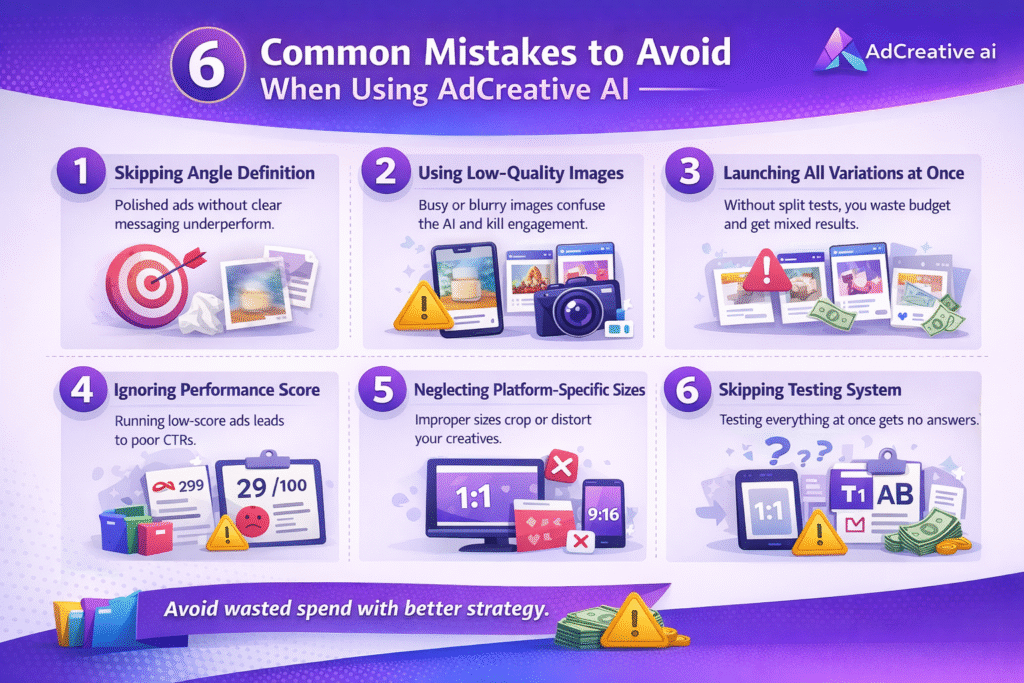
- Generating creatives before defining your angle. The tool will produce visually polished outputs that say nothing specific. Polish without a message equals wasted spend.
- Using low-resolution or busy product images. The AI’s background replacement and layout generation works significantly worse with cluttered inputs. Clean inputs produce clean outputs.
- Launching all variations simultaneously. Split testing loses meaning when you run everything at once. Test two to three at a time, identify a winner, then scale.
- Ignoring the performance score. It is not a guarantee, but dismissing it entirely means making decisions with less information than you have available.
- Skipping platform-specific sizing. A 1:1 creative running on Stories is cropped in ways that destroy the visual hierarchy. Always export in the correct format for each placement.
High-Converting Ads Made Simple
At Axiabits, we combine AI + strategy to create ad creatives that actually convert.
AI Ad Creative Production – Fast, scroll-stopping visuals (static + video)
Conversion Strategy – Clear messaging, strong hooks, targeted audience
Split Testing System – Find winning ads in 72 hours
Platform Optimization – Ready for Facebook, Instagram & Google
Final Thoughts: Is AdCreative AI Worth It in 2026?
The teams that struggle with AI ad generators are the ones treating the tool as a strategy. They generate hundreds of creatives, run them all, and wonder why nothing converts. The tool did exactly what it was supposed to do. The strategy was the problem.
Top marketers are using AdCreative AI to produce and test creatives at scale. Don’t fall behind your competitors.
👉 Get started today AdCreative AI and scale your ad performance faster.
The teams that win are the ones who show up with a clear angle, a defined audience, and a single strong message — then use AdCreative AI to scale that idea across formats, platforms, and variations faster than any designer could.
That is the real shift this tool introduces. Not speed. Not volume. The ability to iterate on strong ideas without the production bottleneck that used to slow everything down.
When I used it that way — clean product input, written headline, performance score as a filter, small-budget split test before scaling — my creative testing cycle went from two weeks to 72 hours. That is not a small improvement. That is a fundamentally different way of running paid campaigns.
Get that right first. Then let AdCreative AI do the rest.
Disclaimer
This article features affiliate links, which indicate that if you click on any of the links and make a purchase, we may receive a small commission. There’s no additional cost to you, and it helps support our blog so we can continue delivering valuable content. We endorse only products or services we believe will benefit our audience.
Frequently Asked Questions
Is AdCreative AI free to use?
AdCreative AI is not free, but it does offer a free trial period. Paid plans start at around $21 per month depending on the tier. The Starter plan covers basic ad generation, while higher tiers unlock more monthly credits and video generation features.
How many ad creatives can I generate per month with AdCreative AI?
The number of creatives you can generate depends on your plan tier. Starter plans typically include around 10 downloads per month, while agency and professional plans can go up to several hundred. Credits reset monthly.
What is the best alternative to AdCreative AI for product ads?
The closest alternatives are Canva AI, Smartly.io, and Pencil. AdCreative AI’s key differentiator is its CTR prediction score — no other tool in this category offers a performance estimate before you spend. For pure volume, Canva AI is cheaper but lacks the predictive layer.
Does AdCreative AI work for both Facebook ads and Google ads?
Yes. AdCreative AI supports multiple platform presets including Facebook, Instagram, Google Display, LinkedIn, and Pinterest. The resize tool lets you export one creative in all required dimensions automatically — no manual resizing needed.
Can AdCreative AI generate video ads or only static images?
AdCreative AI generates both static product photo ads and motion video ads. The video generator creates animated versions of your static creative with text overlays and transitions. It is not a full video editor, but for short-form paid social content it produces clean, usable outputs without any editing software.


